

Your customers write everywhere. You answer from one place.
Every conversation from ten channels lands in one shared inbox your whole team can work. Answers from your own files, a person when nothing matches.
No credit card · Set up in minutes · Cancel anytime
Trusted by teams at
The problem
Customers don't pick a channel. Your team pays for all of them.
Support gets scattered across channels by accident. The fix is not another app. It is one desk.
“Hi, is my order on its way?”
“Re: Refund request #4821”
“Love your product! 💕”
“Do you ship to Lagos?”
“When will this be back in stock?”
“New visitor on pricing page”
“Any update on the API?”
“#support: customer waiting”
“Can I reschedule delivery?”
“Thanks for the quick reply!”
Hi, is my order on its way?
Re: Refund request #4821
Love your product! 💕
The product
Built for the people who actually answer customers.
Not six tools taped together. One desk your team opens every morning, with everything in the same place.
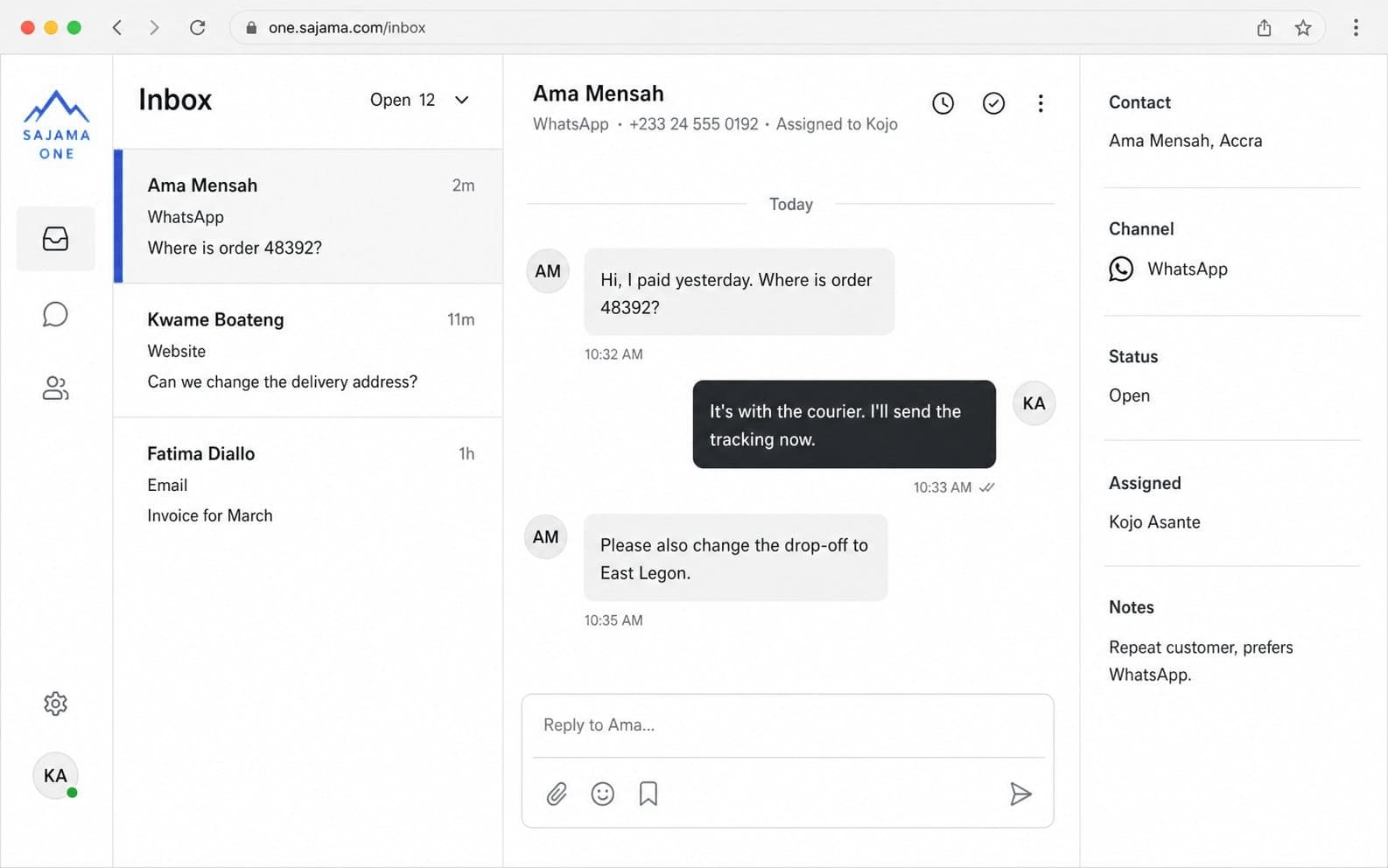
One staffed queue
Every open conversation in the same list, labeled by channel. See what is open, who has it, and what came in last.
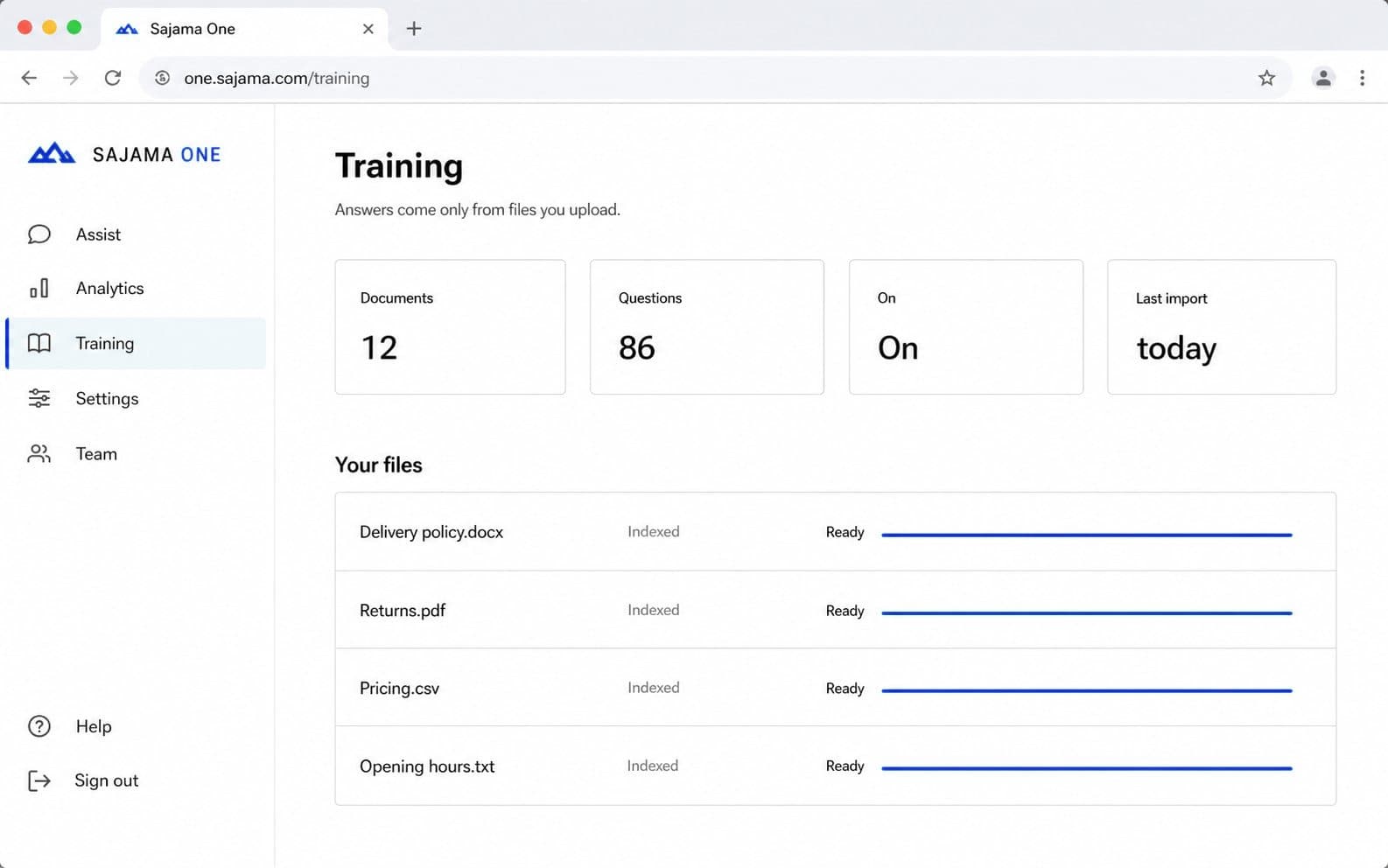
Answers you can stand behind
Upload the policies and FAQs your team already sends. Replies repeat only what you saved, on every channel you connect.
A person takes the miss
No match? An online teammate is offered the chat and the customer is told someone is joining.
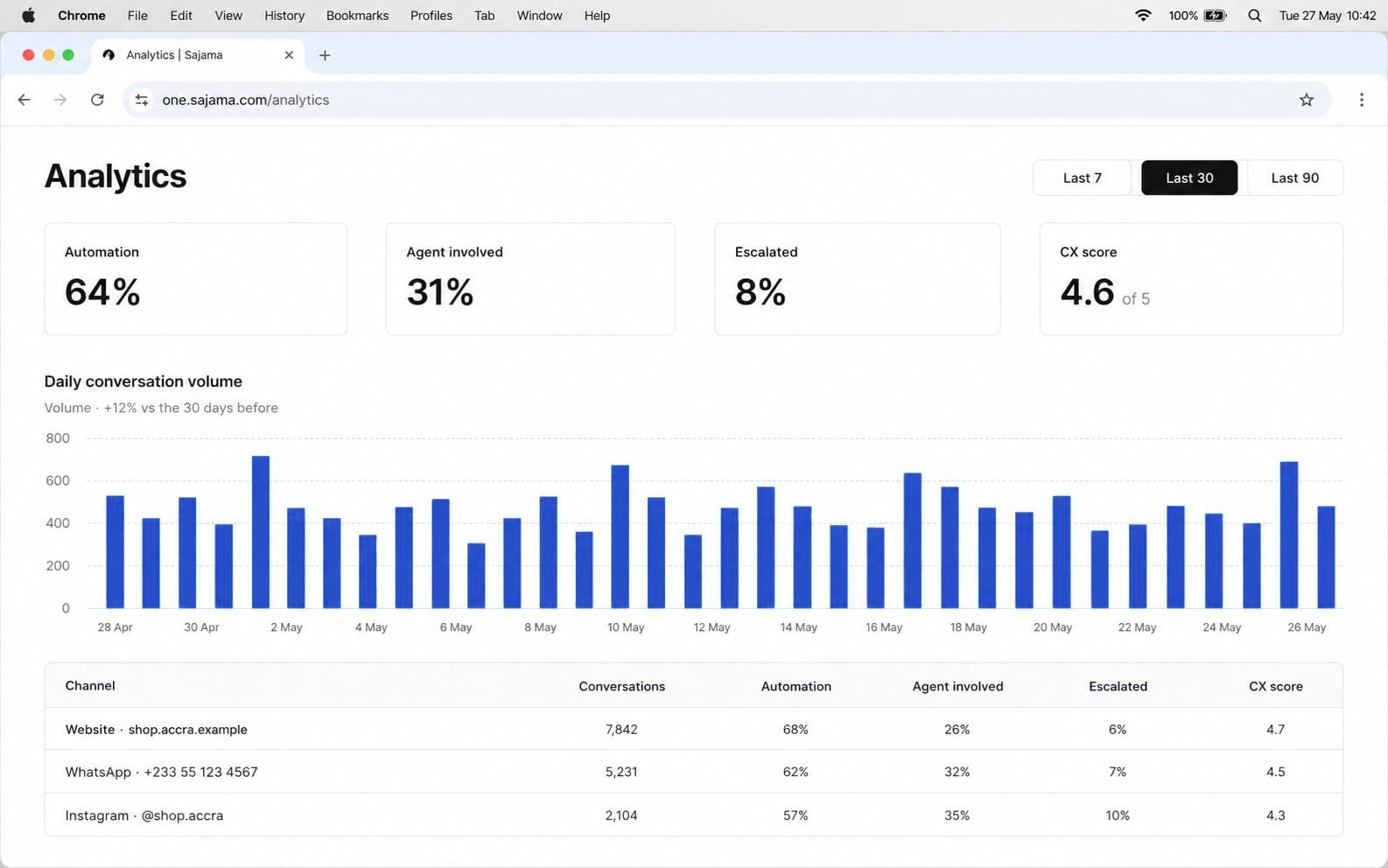
Numbers a manager can use
Volume by channel and site, first reply time, answer coverage, ratings, and why customers rated that way.
How it works
From signup to answering customers in three steps.
Start with the website. Add the rest of your channels without moving desks.
- 1
Put the widget on your site
Create a workspace and paste one snippet. Visitors write, and the thread opens in your inbox straight away.
Website chat is included on every plan.
- 2
Save the answers you already send
Add the refund policy, the delivery times, the questions your team answers all day. A matching question gets that reply instantly, on every channel.
Replies are your own words, matched exactly - never generated.
- 3
Invite the team, then add channels
Bring your agents into the shared inbox, and connect WhatsApp, Instagram, Messenger, email, Telegram, Discord, Slack or LINE when you are ready. The queue never changes.
1, 3 or 5 channel accounts by plan. Priced per workspace, never per agent.
Who it's for
For teams that answer customers. Not for contact centers.
If you are still choosing between six separate apps and an enterprise rollout, this is the desk in the middle.

Shops and sites
Website chat on the store, plus Instagram, Messenger and the rest, without a second tool for each.

Support teams
One queue, assignment, internal notes and SLAs. See who has the thread before anyone doubles up.

Operators who own the words
Replies repeat only the files you upload. Misses go to a person, never to a made-up answer.
Channels
Meet customers where they already write.
Start with the website widget. Connect the other channels when your team is ready. The inbox stays the same.
Website
Live chat on your site. Runs only on domains you allow. Included on every plan.
Included
Business conversations from the number customers already have saved, in the same queue.
Add when ready
Android SMS
A first in this category: a spare Android phone and its SIM become your business texting number. No rented virtual number and no per-message fees from us - texts arrive in the same inbox as everything else.
Add when ready
Direct messages from the account your team already runs, answered beside everything else.
Add when ready
Messenger
Facebook Page messages in the same inbox as the website and the rest.
Add when ready
Support mail treated as a thread with history, not a forgotten folder.
Add when ready
Discord
Server messages and direct messages to your bot, answered from the same queue as everything else.
Add when ready
Slack
Customer conversations in Slack, without your team living in two tools at once.
Add when ready
LINE
LINE chats for customers in Asia, in the same inbox with the same history.
Add when ready
Telegram
Another place customers write. Same inbox, same assignment, same analytics.
Add when ready
Pricing
One price for the workspace. Not per agent.
Every plan includes website chat and instant answers from your own files. Start free, or take a 14-day trial of a paid plan, no card required. Instant answers are matched from the questions and files you save - no third-party AI model is involved.
A 5-agent team pays from $145/mo on Intercom and $275/mo on Zendesk Suite. Every Sajama One plan covers the whole team.
Free
Website chat for a tiny team, free forever.
- 2 agents included
- Website chat, unlimited conversations
- Instant answers from your own files
- Upgrade when you need more channels
Starter
A small team on every channel.
- 5 agents, not $49 each
- 1 account per channel
- Website chat included
- Instant answers + analytics
Growth
Most popularMore seats, more accounts, teams and SLAs.
- 15 agents, one workspace price
- 3 accounts per channel
- Custom teams + SLA tracking
- Contacts + deals CRM
Business
Larger inboxes without a second workspace.
- 30 agents on one bill
- 5 accounts per channel
- Everything in Growth, at 30-seat scale
Enterprise
Personal onboarding and a custom agreement.
- Custom limits and terms
- Named contact
- Invoiced billing
Prices in USD. The Free plan is free forever. Paid plans start with a 14-day free trial. Cancel anytime from the Billing page. Competitor list prices checked October 2026.
Trust
What we actually do with your customers' messages.
A shared inbox holds names, numbers and order details. Here is exactly how Sajama One treats them.
Your workspace only
Conversations, files and ratings stay in the business you signed up with. Another company's agents cannot open them.
Roles are enforced
Agents work the inbox. Supervisors see answers and analytics. Only admins change channels, teams and billing, and the API checks the same rules as the menu.
The widget stays on your sites
It only loads on domains you allow. If someone copies the key elsewhere, you are told in the product and by email, and you can rotate the key.
Replies you can stand behind
Automatic replies come only from the answers you save. Nothing is invented, and a person handles the rest.
Customers never see the desk
Internal notes, tags and assignment stay inside Sajama One. Visitors see the chat, and a 1-to-5 rating if you ask for one.
Deletion on request
A workspace can ask for access, correction or deletion at support@sajamaone.com. The full rules are on Privacy and Security.
How does the 14-day trial work?
Create a workspace and you get the full product for 14 days, no card required. When it ends, pick a plan on the Billing page to keep going. Your conversations stay in the inbox either way.
Which channels can we connect?
Website chat is built in. You can also connect WhatsApp, Instagram, Messenger, email, Telegram, Discord, Slack, LINE and Android SMS (through your own Android phone and SIM - a Sajama One first), and you do not have to connect them all on day one.
Where should we start?
Most teams start with the website widget: paste one snippet, visitors write, threads open. Add the rest when you are ready. The queue never changes.
How do WhatsApp, Instagram and Messenger connect?
WhatsApp, Instagram and Messenger connect through your own Meta app and credentials, so the accounts stay yours. Telegram and Discord need a bot token, Slack a Slack app, LINE a LINE channel, and email needs a forwarding address. Each channel takes a few minutes to set up.
Where do the automatic answers come from?
From you. Save the questions and answers your team already sends, and matching questions get that reply instantly, on any channel.
What happens when there is no saved answer?
The chat goes to an available teammate, and the customer is told someone is joining. If everyone is busy, it waits in the queue until someone picks it up.
Can more than one person work the inbox?
Yes. Assign conversations, leave internal notes and see who already has what. Custom teams and SLA tracking are on Growth and up, and pricing is per workspace, never per agent.
Is every chat a ticket?
No. Live chats stay chats. An agent opens a ticket on a thread when the work continues after the customer leaves, like a refund or a delivery.
How do we pay?
Starter, Growth and Business are listed in USD, monthly or yearly, paid by card. Enterprise is by separate agreement: write to support@sajamaone.com.
Where is customer data kept, and who can see it?
In your workspace. Access is scoped to your team, and internal notes never appear in the customer-facing chat. The details are on the Security and Privacy pages.
Open one inbox for every channel.
Create a workspace, paste the widget, and answer from one queue. Connect the rest when the team is ready.
No credit card · One price for the whole team · Cancel anytime